Awesome stuff, easy to use, has good features! Will explore it more! One issue I have though. I declared some variables and they don't show under Text Input / Prompt. The drop down menu doesn't let me choose. I went to scripting I added var: playerName manually, it works that way. The entry screen shows, the text is stored in variable. But as soon as I go back to the graphical editor, it's gone. It doesn't work and I have to reenter it in the script.
This is a known issue in version 1.9.0 (preview reconstruction during typing, noticeable on large projects), fixed in version 2.0.0. Until the update is released, a partial workaround exists: reduce the embedded assets encoded in base64 in favor of referenced files, which reduces the size of each reconstruction.
Just out of curiosity, since the engine is completely free, is there a reason that you didn't opt to make it open-source? That would be my one hangup with using Capsule, since there's also not an extension/plugin API.
There's a simple reason for this: keeping the core engine closed-source is a deliberate design philosophy choice, not an oversight.
To be completely transparent, Capsule V2 will already cover roughly 95% of the practical use cases for which creators typically rely on Python in Ren'Py, without requiring hours of coding. The engine is designed as a complete narrative solution rather than a general-purpose development framework.
That is also why there is currently no plugin API. I had two possible directions to choose from:
Build a structured scripting and extension system with arbitrary code execution.
Keep Capsule as a secure, self-contained engine with built-in systems and a template system that allows users to create and share gameplay frameworks without executing arbitrary code.
I chose the second approach.
Furthermore, Capsule games are built for ultimate portability and effortless deployment: everything resides within a single, standalone HTML file. While this single-file architecture makes distribution incredibly easy and friction-free for creators and players alike, it also exponentially magnifies the security stakes.
Allowing arbitrary script or plugin injection into a lightweight, web-based file would be a security nightmare. It opens the door to malicious code being executed directly within a player's browser or environment—a glaring vulnerability present in several popular visual novel workflows that shall remain nameless. While some developers prefer to wash their hands of the risk with a "user is responsible, we disclaim all liability" approach, that is simply not mine.
Capsule already includes most systems that typically require custom scripting in other engines anyway: variables and formulas, branching, inventory systems, quests, codex entries, maps, achievements, endings, events, hotspots, reusable animations, HUDs, QTEs, progression systems, and much more.
Capsule isn't trying to compete with Ren'Py's unlimited Python extensibility, Naninovel/Unity's ecosystem, or Dialogic/Godot's scripting capabilities. Those engines are excellent choices for teams that need deep programmability and custom integrations.
The goal of Capsule is different: to provide a highly capable, secure, and easy-to-use narrative engine that covers the vast majority of visual novel, narrative, and RPG needs right out of the box, without ever compromising the safety of the players.
The orange you see is the engine's accent colour (the --primary CSS variable, default #ff9800), and the menu/buttons light up with it on hover/select. The engine links that accent to your Name Box background colour, so the easiest no-code way is to change the Name Box background colour in UI Customization (or per scene) — the in-game menu highlights will then use that colour instead of orange.
Two things to note: it also recolours the dialogue name box (same colour), and the very first title screen may still show orange because it loads before the first scene applies the colour.
I've added an option to customize this in the upcoming V2.
hi im thinking about starting my game using this engine. My question is will it break once 2.0 or will i still be able to work on it going into the 2.0 version
Hi! You can start your game today with 100% confidence.
Not only is Capsule 2.0 fully backward compatible, meaning your project absolutely will not break, but it will actually automatically upgrade and improve your existing game!
I designed the 2.0 architecture so that when you transition, your current project will instantly benefit from the new engine optimizations and features without you having to recode anything. Start building your story now, and the 2.0 update will just make it even better when it drops!
(And to be honest, it's quite possible that version 2.0 will be released within a month. All the tests have been completed; I'm just working on one last major addition.)
You'll make three scenes and (optionally) one inventory item:
chest — the timed scene the player sees
loot — what happens if they open it in time
chest_closed — the fail scene if the timer runs out
1. Define the reward item (if you don't have one yet)
Open ⚙️ TOOLS → Inventory → ➕ Add Item. Give it an ID (e.g. gold_coin), a display name, and an icon (emoji). That's it — you'll reference this ID from the choice.
2. Build the chest scene
Create a scene and name it chest.
In Visual & Sound, set the Background to your chest image.
(Optional) add a line of dialogue for tension, e.g. "A chest sits in the corner — but the floor is starting to give way!"
3. Add the "open it" choice with the reward
In the Choices section of the chest scene:
Click ➕ Choice.
Text:Open the chest!
Target:loot
Add a choice Action → Add item → pick gold_coin (this is the inventory action from the official Choice Actions list).
Optionally add a second choice like Leave it → some other scene, so the player has a real decision.
4. Turn on the QTE timer
Still in the chest scene, open the ⏱️ QTE / Timer section and:
Tick Enable.
Duration:3 (seconds).
Timeout Action:Go to scene.
Timeout Scene:chest_closed.
Now the countdown runs over that scene's choices: the player has 3 seconds to hit "Open the chest!" before the game jumps to chest_closed.
5. Build loot and chest_closed
loot: a scene that confirms the reward, e.g. "You snatch the coins just in time!" — then point its Auto Next Scene wherever the story continues.
chest_closed: the fail beat, e.g. "The floor collapses — the chest is gone." — then continue the story.
6. Test it
Turn on Developer Mode (CONFIG → Developer Mode) so you can jump straight to the chest scene and watch the timer bar deplete (it turns red in the last 30%). Try clicking in time and letting it expire to confirm both branches work.
That's the whole thing — no CapsuleScript needed. One nuance worth remembering: the timer only governs choices, so the clickable "Open" has to be a choice button. If you'd rather have a visual chest the player clicks directly (a hotspot with an Add item action), that's also supported, but a hotspot isn't tied to the countdown — so for a true time-limited event, stick with the choice + QTE combo above.
So hey, I hate to have to ask this, but given Renpy is currently now imploding over this, I need to know: this engine doesn't use any genAI, right? Absolutely not even a molecule of that?
Fair question, and I want to be transparent about it.
Capsule VN Engine itself doesn't use generative AI as part of its core functionality, nor does it rely on AI behind the scenes. However, in version 2.0, there is an optional integration with ElevenLabs (or Azure Speech) that was primarily added as an accessibility feature, to provide higher-quality text-to-speech than the standard Web Speech API for developers who want it.
It's completely opt-in, requires the developer to supply their own ElevenLabs API key, and can be ignored entirely if you don't want anything AI-related in your workflow or projects.
So if your question is whether Capsule secretly uses genAI under the hood: no. If your question is whether Capsule offers any optional genAI-related features at all: yes, through third-party services chosen by the developer.
First of all, thank you so much for the incredible feedback and support. It keeps me incredibly motivated!
As we look toward the future of Capsule, I’d love to get your opinion on a few community updates. If you have a couple of minutes, I’d really appreciate your thoughts on these questions:
1. Comments vs. Forum
Do you prefer keeping this classic comments section as it is, or should I upgrade it to a dedicated Discussion Board (forum) here on Itch.io for easier bug tracking, support, and feature suggestions?
2. An External Forum
In the long run, my dream is to have a completely independent community forum for Capsule (similar to what Lemma Soft is for Ren'Py).
However, building and maintaining something like that is a huge amount of work, and realistically I can’t do everything alone while continuing development of the engine itself.
So I’m wondering if anyone in the community with web development experience would be interested in helping build, host, or set up an independent forum platform (such as MyBB, phpBB, etc.).
Any help — whether technical setup, administration, structure, or community management — would be a monumental help for the project!
3. The Website & Documentation
I’d also love to hear your feedback about the official website and the documentation.
2. I may be able to help with this, so let me know when it's looking more likely timing-wise to tackle that.
3. One key thing is how the documentation is presented: one giant scrolling webpage with no search feature (beyond Ctrl-F) doesn't work for me (or for most serious users, I assume). I'd strongly recommend spinning off a sub-domain like docs.capsulevn.com and then using something like Docusaurus or BookStack or maybe even GitBook to create a more "formal" and structured documentation site.
The forum is up and running, thanks to TheDivide who was discreet here but helped me immediately. I sent you the address by email, let me know if you received it, otherwise check your spam folder.
I feel a discord server would work a lot better than a forum in all honesty. Best part you can make a bug report section and make a "please help me" for those who are having questions or are struggling with areas of the program.
Thanks for the feedback! I totally get where you're coming from. Discord is great for real-time conversations, quick troubleshooting, and building a casual community.
That said, for a development tool like Capsule, I feel a forum has some important advantages. The biggest one is that discussions stay organized and searchable. Forum posts can be indexed by search engines, so if someone encounters the same issue or has the same question months later, they can often find the answer with a quick search. On Discord, useful information tends to disappear into the chat history, which often leads to the same questions being asked repeatedly.
That's why I'm currently leaning more toward a forum-based community: it makes support, bug tracking, and knowledge sharing much easier in the long run.
That said, I really appreciate the suggestion, and I wouldn't rule out creating a Discord server in the future—probably as a place for community chat, feedback, and general discussion alongside the forum.
You will have news soon, but version 2.0 is a massive milestone that completely revolutionizes the engine under the hood. Because it's such a huge overhaul, it’s taking a bit of time to polish perfectly, but the good news is that the vast majority of the work is already done!
I don't have a strict ETA just yet as I want to ensure absolute stability for this big leap, but we are getting closer every day.
That being said, don't hesitate to jump into version 1.9 right now! It is already rock-solid for creating and exporting your visual novels, and learning the basics today will make your transition to the power of 2.0 even smoother. Stay tuned!
Totally understood. I'm glad to hear that the massive overhaul 2.0 is going well. I'm still going to wait on it before I jump into game creation seriously, though I have perused the documentation for 1.9 to start to get acquainted with the whole architecture.
One thing I noticed and wanted to mention about the playable demo on the https://capsulevn.com/ site: if you switch to fullscreen mode, the character image doesn't adjust proportionally in terms of vertical screen placement, so she ends up getting mostly hidden by the bottom UI. I assume everything is supposed to scale responsively and maintain spatial consistency, so you might want to look into why the demo is doing that.
Finally, if I could get early access to 2.0, I'd be glad to be a beta tester or something. Regardless, once 2.0 is officially out, I'd be glad to create a small but feature-packed demo game -- using higher-end audio and image assets, plus leveraging as many of the cool (not basic) features as possible -- that you could use for promotional purposes or whatever.
Thanks so much for your support, the kind words, and for taking the time to study the 1.9 documentation! It’s great to see people diving into the architecture early.
Regarding the fullscreen issue you noticed on the demo: that’s very interesting. I just did a thorough test on my end using the in-game Option → Fullscreen button, and the character resizing and vertical positioning work perfectly as intended, keeping everything proportional with the UI.
Since the engine relies on a custom responsive scaling system to lock the aspect ratio, this glitch might be an edge case caused by using the browser's native fullscreen shortcut (like F11), a specific browser zoom setting, or how the iframe behaves on the landing page wrapper. Could you let me know what browser, device, and screen resolution you were using when it happened? I'd love to look into it and make sure no edge cases escape!
As for your offer: it's a massive YES! I would absolutely love to have you on board as a beta tester for version 2.0. Having a high-end, feature-packed promotional demo that leverages the advanced systems (like the new procedural text, 3D theater, or RPG templates) is exactly what Capsule needs for its official launch.
I got your email since your gave a donation, i will give you some news soon by mail.
Right now I'm trying to implement a time limit and there's nothing telling me how it works. I put in the time and I test it, but I have no visual cues or indicators that it's working, and also nothing is happening of course. Can someone tell me in detail how to make it work?
Nevermind I just found out how it works... but I ask why have it there and not specify it's for CHOICE BUTTONS ONLY!?
I was honestly hoping to have a timed scavenger hunt but it looks like there's currently no way to implement that unless someone can tell me how to make a timer that works.
Lastly, I got a variable error going on: I have implemented a system with 5 logic scenes and after doing it the dialogue/text boxes disappear after I successfully get each variable. I had to do multiple variables because for some reason I cannot make a limiter for how many of a variable I want to be collected, because when I implemented it simply with one variable, it escalated to where the same variable could be increased by clicking the same hotspot on repeat, and I either need a clear explanation of how to fix that, or that needs to be critically updated in the next release.
So a bug I've discovered, mainly because every time it just partially crashes the software (like I cannot delete the scene and makes other scenes disappear), the text input/prompt feature doesnt work. I have tried for over 30min for something to happen, but the only major thing it did was slow Edge so much that it would take forever to load a webpage (luckily Opera was unaffected). All I'm trying to do is make an "insert player name here" prompt and it won't do anything. Is anyone else having this issue?
Thank you for reporting this. What you are describing (the browser slowing down heavily and freezing the interface) is a textbook sign of an unintentional infinite loop being triggered in your event sequence.
If the engine falls into a loop while waiting for the text input, it will freeze Microsoft Edge's script handler instantly, which explains why you can't delete the scene or why other elements seem to disappear.
How to fix it right now in version 1.9: Check the triggers around your text input action. Make sure the action that prompts the player for their name is triggered only once (for example, at the very start of a scene via a single "On Scene Start" event). If it's placed inside an event that continuously fires or loops, it will crash the tab.
For Version 2.0: The great news is that the upcoming version 2.0 completely rewrites how inputs and actions are queued. It includes built-in safe-guards that asynchronously pause the engine execution until the player explicitly submits their text, making it physically impossible for an input prompt to trigger an infinite loop or freeze your browser ever again!
Double-check your event triggers for that scene, and let me know if moving the text input to a single-fire action fixes the freeze for you!
Thanks for the details. What you are experiencing with the text box is a known sequence layout quirk in version 1.9 when chaining multiple direct variable actions onto hotspots.
The great news is that version 2.0 will completely rewrites the action execution pipeline under the hood, which natively fixes this rendering issue. In the upcoming release, variables and UI states are completely decoupled, meaning modifying a variable will never accidentally close or cut off your dialogue boxes again!
In the meantime, to fix your variable escalation issue right now in 1.9 without needing 5 different logic scenes, you can use a single variable as a "gatekeeper" switch:
Create a variable called {hasCheckedSpot} (default: false).
On your hotspot, add a Conditional Check (If/Else):
IF{hasCheckedSpot} is false: Increase your main variable, show your text, and then set {hasCheckedSpot} to true.
ELSE: Show a text saying "There is nothing left here."
This will instantly lock the hotspot after the first click and stop the spamming. Hang tight for version 2.0, it’s going to make all of this incredibly smooth!
Haha, glad you figured it out, and sorry for the confusion! You are totally right: currently, that built-in timer field is specifically designed to auto-select a default option when a Choice menu times out (like in quick-time events). I'll definitely update the UI hints to make that crystal clear in 2.0!
As for your timed scavenger hunt idea—that sounds absolutely awesome!
While there isn't a "global gameplay timer" button yet, you can actually create a customized timed scavenger hunt right now using CapsuleScript or variables. You can set a variable (like {timeLeft} = 60), and use a parallel event or a quick conditional loop that ticks down every second while the player searches the screen for hotspots. If {timeLeft} hits 0, you trigger a jump to the 'Game Over' scene.
That being said, I absolutely love the idea of a dedicated, visual, and 100% no-code global timer widget for puzzles and exploration scenes. I'm adding a "Global Scene Timer" component to my todo list for future updates so you can make these kinds of mini-games with zero hassle.
Thanks for the honest feedback, and good luck with the ninja stealth/scavenger hunt!
I'm currently trying this out for the first time and have little knowledge of how exactly all of this works. Is there a tutorial I can look at to get an idea of what to do?
I'm on with making some (not the dev, just a fan), but there is a question mark next to most bits that explain what they are.
You're best off changing the simple/expert slider at the top to on - that will get you expert mode. Sounds scary, but I find it much easier as it gives you a menu list that lets you add in and create stuff more easily.
There is a drop-down menu near the slider in expert mode which will give you access to the individual bits: actors (characters); user interface (UI/UX), where you can change what is there already, or add your own custom designs; and locations, though there's plenty more.
To build your game easily, the simpler way is: add your characters, with their names and appearance; add your locations; THEN start adding your dialogue. To have branching paths, you can add those as options in the same screen as you do the dialogue.
When you complete your dialogue you'll be almost finished! Check through everything, add in sfx and lighting, edit what you need to, then do an exported file for testing. If your test is okay, then you can start uploading it to different services. Make sure the file and test is fine on PC, then you should be alright to export to mobile.
I am learning what I can and variables took way longer than what I wanted to have work, I do wish you could layer hotspots on top of one another so you can get different messages after getting something from said spot.
Hi! Thanks for the feedback. Variables can definitely have a bit of a learning curve at first, but they open up so many possibilities!
Instead of physically layering multiple hotspots on top of each other (which can get super messy to manage in the editor), you can actually achieve this exact result right now using a single hotspot combined with a conditional check (If/Else)!
For example, you can create a variable like {hasKey}. Inside your hotspot logic:
IF{hasKey} is false: Show the message "You found a key!" and set {hasKey} to true.
ELSE: Show the message "The drawer is now empty."
That being said, I want to make this workflow even more seamless and "zero-programming" for everyone. I'm taking note of your feedback to see how I can make conditional hotspots even easier and more visual to set up without jumping through hoops in future updates.
The site is fine, if you have a vpn or internet-dependent spyware scanner it can flag it as a false positive, depending on the program and country. Here is the website link I use, and it's fully safe:
Hi there! The website is 100% secure and uses a fully valid, verified SSL certificate (you can check global diagnostic tools like Google Safe Browsing or SSL Labs, which rate it at the absolute maximum).
If your browser or antivirus is throwing an 'unsafe' warning, it's a local false positive. This sometimes happens with ultra-strict security filters because the site hosts development tools for compiling software (like Capsule HTML2EXE/APK). You can safely bypass the warning or add the URL to your exceptions without any risk!
This is amazing. Most VN creator software always had the minimal amount of features and a janky ui, which made it frustrating to use for non-coders. So it took me years to find a good one. I plan to try it, but, will the characters have animated and changeable expressions in the future? 'cause animated characters make the characters feel more lively. I also saw that some engines can use Live2d models too, so maybe that can be added to the to-do list?
You can already do the sprite anims! If you go to the character menu, where you add the actors for your game, once you add their name and text colour, the image can be added below - you can add individual expression images, and sprites-sets.
The sprites-set is just as individual pictures, but you can pick the number of columns and rows and do it like a rotascope sheet too, bit like in RPGMaker and RPGPaperMaker.
From what I remember, the 2.0 release will have a 3D add included, but more info is in the DevLog above. Live 2D I'm not sure of.
Oh that's actually perfect! Thank you for replying. I mainly wanted framed animations, so live2d is just an option I suggested since I've seen a plugin for rpg maker once. Honestly I am happy with how it currently is. ^^
That's awesome to hear! And honestly, you're asking at the perfect time.
For the upcoming version 2.0, I am actually building a native Animation State Machine directly into the engine.
The goal is to let you easily link multiple frame animations (like idle breathing, blinking, and talking) to a single character. The engine will handle the transitions and triggers automatically in the background (for example, making the mouth move automatically when text appears, or blinking at random intervals).
You will get a dynamic, lively result very similar to Live2D, but with a massive focus on ease of use and zero coding required.
I can't wait for you to try it out in the next major update! Thanks again for your awesome feedback!
Bumping this, since it's been a while: what’s the ETA for version 2.0? I’d rather wait on that to start seriously using the system, if it’s not too far away.
I don't have a strict ETA (2,3 monthes max probably) just yet as I want to ensure absolute stability for this big leap, but we are getting closer every day.
Engine's running lovely - quick question though (again, sorry!): is there a way to remove the file size cap for the scene background? The bg I made is animated, and I'm intending to use interactive spaces as "buttons". The video I made is 181mb but the accessible size is 20mb. 20mb is fine for static, but if it's more complicated and moving that's barely anything, including for moving credits or start-up game vids.
Hi! No need to apologize at all, I love seeing people push the engine to its limits!
The 20MB limit is actually a safety guardrail. Since Capsule compiles everything into a single, standalone HTML file, embedding a 181MB video directly inside the file (as Base64 data) would severely hurt the game's performance, cause massive loading times, and potentially crash web browsers due to memory overloads.
How to bypass it for heavy animated backgrounds: Instead of uploading the video directly into the engine's internal storage, you can use an external path!
Place your heavy video file (e.g., my_epic_bg.mp4) in the same folder where you export your game.
In Capsule, instead of importing the file, simply type the local relative path (like ./my_epic_bg.mp4) or a direct web URL in the background field.
This keeps your standalone HTML file ultra-light and fast, while allowing the browser to stream your 181MB animated background flawlessly in the background! Let me know if that works for your interactive setup!
(BTW 181MB is really huge, even a webp could be lighter, so i plan to also add hotspots on videos, it could also help)
Hay! Just start to play with engine. Can I sell comercional games made in your game engine? Also, is it posible to add custom textbox and buttons? Thanks
Hello! Not sure if you still need an answer, but I've been messing around with the engine since it came out (not a Dev, just a User). As far as I remember there is no ban from using CapsuleVN to make commercial indie games (big companies, give them some moolah!)
You can absolutely change the text boxes and buttons. First, here's how to change your textbox: you can switch to Expert mode (toggle at the top) then select UI Custom as on the screenshot. It'll give you the chance to change text and boxes etc with what is already in the box, which is a fair bit, but a little lower there's a custom option, where you can make and import your own textboxes.
Secondly, buttons. You can absolutely change these. In the same drop-down menu just select UI Customisation. This lets you change out buttons, dialogue box backgrounds, and menu images.
If you need an interactive button that needs to act as an invisible area (like a touch map, for example) just put in a standard map image then add buttons targeting what you need, or use Point-and-Click Hot Zones in the scene options itself.
Great question! Yes, native Linux support is absolutely planned for version 2.0! > Since the engine is built on modern web technologies, packaging it for Linux is completely doable. Even though I mainly develop on Windows, I am setting up the build pipelines so that version 2.0 will launch with native executables for both Windows and Linux users right out of the box.
Thank you both for the hype and support, it really motivates me to push these cross-platform features forward!
Version 2.0 is a massive milestone that completely revolutionizes the engine under the hood. Because it's such a huge overhaul, it’s taking a bit of time to polish perfectly, but the good news is that the vast majority of the work is already done!
I don't have a strict ETA just yet as I want to ensure absolute stability for this big leap, but we are getting closer every day.
That being said, don't hesitate to jump into version 1.9 right now! It is already rock-solid for creating and exporting your visual novels, and learning the basics today will make your transition to the power of 2.0 even smoother. Stay tuned!
I'm planning a VN that has animated scenes. Will there ever be version with like a video player? Or like let me upload a gif for an animated menu? I can do these things in Renpy, but an engine that doesn't need me to code has me chomping at the bit haha
Hi there! Thanks for the feedback and your interest in the engine!
You will be happy to hear that the engine actually supports both of these features natively, with absolutely zero coding required.
For your animated menus, the engine accepts standard image formats, including animated GIFs. You can simply upload a GIF as your main menu background to give your game that dynamic, classic Japanese visual novel feel right from the title screen.
For animated scenes, the engine natively reads video files (like .mp4 or .webm). You can seamlessly use them as scene backgrounds to play your anime-style cutscenes, and they are also fully supported in the unlockable CG Gallery.
Let me know if you have any other questions, and have fun creating your VN!
been keeping my eye on this for a while and i will say im impressed with what it is so far.
now i do have a question that might be dumb, but i haven't figure it out yet: how do you make character switch sprites between dialogs in an Scene? or make then appear and disappear in that same scene?
Hello izrax, thanks a lot, im glad you like Capsule !!
Actually the expression/sprite stays the same throughout the scene. To switch sprites between dialogues, you currently need to split into multiple scenes that chain together with "Auto Next Scene". Each scene can have a different characters configuration (different expression, position, or even remove a character entirely). Since transitions can be set to none, this feels seamless to the player.
However, that's a relevant idea, so I think I'll add the option to include a BBCode [expr:actorId:expression] in the dialogue to allow changing the expression within the same scene. This would help reduce the number of scenes. Excellent idea!
So in 2.0, in the same scene you will be able to make something like : [expr:alice:happy]I found the key ! [expr:alice:sad]But at what price... [expr:alice:angry]I will never forgive !
ooh i see. yeah this seemed counter intuitive cause a scene most time should hold all the actions . plus that would make the visual timeline less cluttered and efficient .
may i suggest you also add the ability to change characters, music/sfx , and background too.
I just made a significant monetary donation to this, even though I haven't even downloaded the tool yet, on principle alone. This is an extremely exciting and promising project for non-programmer VN design and development. In fact, based on its current trajectory, I could seriously envision this being a major disruptor in the whole VN dev landscape ... possibly even displacing Ren'Py as the new "point of entry" for beginning VN devs.
For context, I'm currently developing my first game ... an adult RPG / eroge VN / fantasy dating sim / magic card battle hybrid ... in Unity with Naninovel. While I wouldn't expect Capsule to be able to handle Unity-like things such as particle systems or post-processing effects (at least not in the near future), I can already imagine recreating my entire project in this engine.
Again, totally sight unseen at this point (so maybe this will be apparent once I start playing in it), but some key features that I would need to fully embrace Capsule include:
being able to trigger and attach one-off sound effects to game events
being able to loop environmental sound effects, logically separate from the one-off SFX
being able to loop background music in a totally separate audio channel from both the one-off and looped SFX
having yet another independent audio channel/track for character voicing
allowing the player to independently adjust the volume of all three distinct audio channels ... voicing, SFX, and music ... on the fly
having some sort of very basic "animation" framework, such that I could sequentially play back a series of still images (WebP would be preferable due to its optimized size) at variable frame rates by specifying FPS values
allowing custom UI screen components that would be event-driven by custom variables for things like money, HP, and other player stats (mana, stamina, attack power, etc.)
These are just my initial thoughts. I'd be glad to help beta-test new updates to the engine, as I'm very much in the not-traditional-VN game development camp. Keep up the amazing work!
Thank you so much for the incredible support and the generous donation! Reading your enthusiasm completely made my day. Your adult RPG / dating sim / card battle hybrid sounds like an epic adventure, and it’s exactly the kind of ambitious project I’d love to see brought to life in Capsule! I must admit I've played a considerable number of hybrid visual novels for adults. The card game style (for battles, for example, or for creating conditioning builds) is a fairly niche type of game, and it's not the easiest to make. I wish you the best in your game creation!
Naninovel is an excellent choice for those who are proficient in Unity. Capsule doesn't have Unity's technical power and never will, remaining a monolithic engine. And besides, I'm not trying to compete with engines like Naninovel, which is based on Unity, or DiaLogic, which is based on Godot; they're not targeting the same audience at all. Capsule isn't limited to games; it can be used for interactive lessons, presentations, and more.
As a narrative/RPG engine, Capsule already surpasses well-established engines like TyranoBuilder, Visual Novel Maker, Twine, Narrat, and others. Ren'py remains technically more powerful with its Python code, which unlocks almost unlimited capabilities, but it doesn't measure up in terms of portability, ease of use, security, project management, native features, and even longevity (since an HTML game created with Capsule will still work in 2050). Not to mention that the CapsuleScript DSL is currently the only one that allows for the automated creation of game architectures via simple LLMs.
And this is just version 1.9.0; version 2.0 will add an incredible array of features while increasing stability and power, always keeping in mind the need to make game creation accessible to both beginners and professionals.
You'll be happy to know that several of the features you listed are already in your inventory:
Animations: The engine features a built-in Sprite-Sheet Animation system that natively supports variable FPS, looping, and different playback states. (And yes, optimized formats like WebP work perfectly!). It's also easy to use animations created in Spine or Inochi2D. Instead of exporting Spine's native JSON/binary format, for example, you export the animation as a PNG image sequence. You then use a third-party tool (like TexturePacker or Free Texture Packer) to group this sequence into a single grid of images.
Custom UI / Stats: The HUD Variables Display system allows you to dynamically show custom variables (like Money, HP, Mana, Stamina) directly on-screen with different visual styles and icons. I plan to make it even more customizable for even more personalized placements or the import of your own background images to customize this interface.
SFX & Music: BGM and SFX run on separate channels, and the engine manages overlapping sound effects smoothly.
Regarding your audio requests: currently, the engine operates on two primary audio tracks (Music and SFX) with their own volume sliders in the options, alongside the TTS features (in V2, not released yet). Expanding this into a dedicated 4-channel mixer (BGM, Looping Ambient, Voice, and One-off SFX) with independent on-the-fly volume sliders is a fantastic idea. I am definitely adding this to the roadmap to fully support proper voice-acted VNs!
I would absolutely love to have you onboard as a beta-tester! Feedback from developers pushing the boundaries of traditional visual novels is exactly what I need to make Capsule a true game-changer. Let's keep in touch!
Hi Corvi, thanks for your feedback, i hope you have fun with the engine !
The exported projects all have an obfuscated section, a built-in anti-cheat system.
This makes the file incompatible with any attempt at a complete translation and therefore with importing it into the engine. I wouldn't be able to translate one of these files myself. That's why you absolutely must use the save function. Exporting is only for publishing the game.
For debugging, you already have logic preview, project health, and development mode. No other engine offers this natively.
V2 with include a resolution function to go from 16:9 to 9:16 and even 9:20.
Until then you have to find this in the exported game :
Hello from France! 🌸 Thank you so much for trying out Capsule VN Engine, it's awesome to see it reach creators in Ukraine!
Currently, the engine defaults to the classic visual novel landscape format (16:9, 1920x1080). However, since Capsule exports everything into a single, clean HTML file, you can easily "hack" it to fit a 9:20 vertical smartphone format!
Here is the quick ninja way to do it:
1. Tweak the Engine's CSS Once you export your game, open the .html file with any text editor (like Notepad or VS Code). Look near the top for the <style> tags. Find the #game-viewport rule and change the resolution:
Change:width:1920px; height:1080px;
To:width:1080px; height:2400px;(This gives you a perfect 9:20 ratio!)
2. Adjust the UI Because the screen is now narrower, you might want to find the #dialog-box in the CSS and adjust its width and bottom margins so the text box fits perfectly on a vertical screen like a modern Otome game. 📱
3. Use Portrait Backgrounds Simply upload vertical backgrounds (1080x2400) directly into the engine while building your story. They will look stretched in the editor, but will display perfectly in your final modified HTML file!
I am definitely taking notes and planning to add a native "Vertical Mode" switch inside the editor for a future update. I would love to see the vertical novel you create with it! ✨
Thank you so much for your interest and for reaching out. You are absolutely right—version 1.8.32 introduced a lot of powerful mechanics (like the inventory, QTEs, and advanced logic) to help creators build rich, anime-style visual novels, and proper documentation is the next logical step!
Right now, I am looking into the best way to provide this. I am planning to create a comprehensive guide to cover all the features.
In the meantime, don't hesitate to rely on the tooltips available inside the editor (especially in Expert Mode), and feel free to ask any specific questions you might have right here in the comments. I'd be more than happy to help you figure out a specific feature!
Gave this a download on the off-chance it would work for my horror puzzle vn, and I'm really impressed so far! There's stuff it obviously needs, I couldn't find interactive areas for example (that could just be me though), but I'm surprised at how much is already here. I like the options for character movement - I'm thinking I'll make the front menu as a scene and that will let me animate the salt ring if I set it as a character.
Would like to be able to remove the main menu and use a scene for it instead, and be able to shut off the dialogue box per scene, as well as interactive areas, but honestly - for such a new engine it's super promising.
Wow, thank you so much for your feedback! 🌟 It's great to see that you're planning to create a horror and puzzle game with Capsule.
You're currently using version 1.6.2, but I have some excellent news: almost everything you mentioned is already implemented in the upcoming v1.8.0 update (and that's just a small part of all the new features coming in version 1.8.0)!
Interactive Zones: The new version introduces a complete point-and-click system (interactive zones) with customizable cursors (magnifying glass, hand, etc.). You'll be able to create real puzzle scenes.
Customizable Main Menu: It's already possible to bypass the main menu in version 1.6.2; just go to GUI and check the Enable Auto-Start box.
Hiding dialogues: This is already possible. When editing a scene, simply leave the name and dialogue fields empty to make the dialogue window disappear.
Animated salt ring: This won't be available in version 1.8.0 (although effects can already be applied to character appearances), but it's already functional in version 1.9.0, which I'm currently working on. This upcoming update will support sprite sheets, allowing you to easily create looping animations for any character (or object).
I'm working hard to refine Capsule VN Engine. Stay tuned, version 1.8.0 should revolutionize your project! 🚀
Thanks for your feedback, i wish you the best with your project. Concerning the effects, I'm working hard on it, you've given me a real challenge! But i think it should be done in the next version.
For cut scenes, splash screens etc, it would be good to lose the text box completely and have just a blank screen to play with
I find the character appearance action inappropriate on occasions -- that little jump at the start of the scene can break the flow and even look a little comic at times: it would be nice to have an option of just a straight 'cut' with no action for characters
There is an anomaly with backgrounds -- after two or three scenes with identical picture formats (webp, jpg and so on), I have had to change the picture format to get the next background to load
But yeah, it's simple and straight forward, so kudos so far!
Hello, dear developer.!When I first met, I expressed my expectation for this software.✧*。٩(ˊᗜˋ*)و✧*。I hope this editor can support it in the future.The language of Chinese.(I, a China player, expressed my expectation.)course, I am also looking forward to one-stop export to apk.Thank you for your continuous development and update!
(ps:Is the character in the editor icon the official oc?The painting style of the character looks cute and kind.(This is just a little abrupt problem, so don't worry about it.))
Thank you so much for your warm and prompt reply! It's great to hear that Chinese language support is on the roadmap - I'm really looking forward to it!
I've tried the engine and I'm impressed by its potential! The support for variables and branching is a solid foundation for storytelling.
To help me plan my project better, I have a couple of questions about the future direction:
Are there any plans to make the exported HTML project more optimized for packaging into standalone applications (like APKs for mobile)?
Could you tell me a bit more about the two characters (the green-haired one and the red-haired girl who loves painting)? They both have such unique and charming designs! Are they the official OCs of the team? They really spark imagination!One day, after I practice my painting skills, I want to draw free illustrations for them.
Wishing you the best with the development! I'll be cheering for you from the sidelines.
Thank you so much for your energy and kind words! It really motivates me. I am indeed working hard to make Chinese support a reality soon.
Regarding your questions:
1. Mobile Packaging (APK): Actually, Capsule VN Engine is inherently optimized for this! Because it exports a Single HTML File with zero external dependencies (no folders, no loose assets), it is incredibly easy to wrap into an APK. You can use tools like Capacitor, Cordova, or even simple "Website to APK" converters. You just feed them your game's HTML file, and since all data is embedded inside, it works offline on mobile immediately without any path/loading issues. We plan to write a tutorial on this in the future!
2. The Characters: I am so happy you like them! Yes, they are the official mascots of the engine.
The green-haired girl is Aiko, she represents the logical/coding side of the engine.
The red-haired girl is Laetitia, the creative artist soul that help me!
I would be absolutely honored to see your illustrations of them! Please do share them if you draw them one day!
Feature Suggestion: Enhancing Input Box for Richer Branching Narratives
Hi!CapsuleTeam!ദ്ദിᵔ.˛.ᵔ₎✧
Thank you so much for your detailed and encouraging reply! It means a lot to me as someone who is passionate about creating interactive stories and truly believes in the potential of CapsuleVN Engine.
I'm particularly excited about the official mascots, Aiko and Laetitia. They perfectly represent the two sides of creation - logic and art. I'm currently learning drawing skills, and it's my goal to create illustrations for them once I feel confident in my abilities. I would be honored to contribute as an early supporter!
♡(*´∀`*)人(*´∀`*)♡
Based on my experience with other visual novel engines, I have a feature idea that I believe could greatly empower creators to build more immersive and branching narratives.
Thank you for your detailed and encouraging reply regarding the APK export and the official characters! I'm very excited about the future of the Capsule engine.
I'm an indie creator passionate about narrative-driven games. While exploring tools, I often imagine scenarios where players advance the plot by typing specific words or phrases rather than just selecting from multiple choices. For example:
In a puzzle segment, entering a secret code (like "moonlight" or "raven") to unlock a door.
The story branches based on a key response the player types.
I understand that complex Natural Language Processing might be challenging to implement. Therefore, I'd like to suggest a potentially more feasible feature: a customizable "Keyword Input & Judgment" component.
The ideal functionality might include:
Preset Keywords: Creators can pre-set several keywords or phrases they expect players to input (e.g., setting keyword "trust" to trigger branch A, and "silence" for branch B).
Fuzzy Matching: The system could recognize if the player's input contains these keywords, without requiring exact match, improving user experience and error tolerance.
Conditional Jump: Upon a successful match, the game could jump to a designated storyline or scene, similar to handling conditional branches.
This functionality would unlock new possibilities for genres like mystery, puzzle, and high-freedom RPGs, moving interactions beyond multiple-choice questions towards "open dialogue" or "password-based" immersion.
I've previously used an engine called Kocho (which has a blue butterfly as its icon) for simple prototypes. Its interface was quite intuitive for basic input handling. Perhaps some interaction logic from it could offer a reference point for usability design, even though Kocho is no longer updated.
Implementing such a feature would be a groundbreaking "killer feature" for creators focusing on deeply interactive stories. Thank you again for creating such a promising tool and listening to community feedback! I look forward to witnessing the growth of the Capsule engine.
Thank you so much for this incredibly detailed feedback! I really appreciate you taking the time to explain the logic and even citing Kocho as a reference (I remember this engine, it had some great ideas!).
I have great news for you: You are perfectly in sync with my roadmap.
i was just analyzing the roadmap for the next major updates, and a "Text Input / Keyword System" is actually in our priorities! Your suggestion confirms that this is exactly what creators need right now to unlock the Mystery/Puzzle genre.
I will definitely implement the logic you described:
Input Variable: Storing what the player types into a variable (e.g., player_answer).
Keyword Matching: Checking if the input contains specific words (Fuzzy match) or matches exactly.
Conditional Logic: Jumping to different scenes based on the result.
Consider it done! This feature will be integrated into the upcoming v1.8 update (because the 1.7 is already done but not released yet).
Thank you for helping us shape the future of Capsule. Your feedback is invaluable! ❤️
Thanks for your feedback. If you're referring to the application itself, it's normally set to English by default. Otherwise, you need to click the button to change the language in the menu at the top right.
If you're referring to the visual novel preview on the right, it's possible that the preview was displayed in French.
In that case, click on "Config." This will display the visual novel's start screen. There, click on "Options" in the preview screen and select English. This should fix the problem and save your preference locally in your browser. So, every time you log back in, it will be in English.
Hi Goliard, Can you add a screenshot please? I just tried with Edge, Opera and Chrome and it's working.
EDIT: I've been working on a new multilingual model; now the application appears in English by default, both the application itself and the preview. This should have resolved your issue.
To add other languages, you need to click the "CONFIG" button. If you change the interface language and have added the language via "CONFIG", the preview will change dynamically.
Thanks for your feedback, I'm glad you like the app. The next step is to allow users to edit scene names and also move them around, in case they accidentally switch scenes.
I think the update will be live soon (probably today).
I'll be launching a Jam soon to invite developers to test the app, and I hope you'll be among the participants :)
← Return to tool
Comments
Log in with itch.io to leave a comment.
Awesome stuff, easy to use, has good features! Will explore it more!
One issue I have though. I declared some variables and they don't show under Text Input / Prompt.
The drop down menu doesn't let me choose. I went to scripting I added var: playerName manually, it works that way. The entry screen shows, the text is stored in variable. But as soon as I go back to the graphical editor, it's gone. It doesn't work and I have to reenter it in the script.
BREAKING NEWS: Capsule V2 will be available by the end of the month !
Great news!
The engine is lagging every time I type in the dialogue box. Other than that I am impressed by just how many features this is packed with.
This is a known issue in version 1.9.0 (preview reconstruction during typing, noticeable on large projects), fixed in version 2.0.0. Until the update is released, a partial workaround exists: reduce the embedded assets encoded in base64 in favor of referenced files, which reduces the size of each reconstruction.
Just out of curiosity, since the engine is completely free, is there a reason that you didn't opt to make it open-source? That would be my one hangup with using Capsule, since there's also not an extension/plugin API.
There's a simple reason for this: keeping the core engine closed-source is a deliberate design philosophy choice, not an oversight.
To be completely transparent, Capsule V2 will already cover roughly 95% of the practical use cases for which creators typically rely on Python in Ren'Py, without requiring hours of coding. The engine is designed as a complete narrative solution rather than a general-purpose development framework.
That is also why there is currently no plugin API. I had two possible directions to choose from:
I chose the second approach.
Furthermore, Capsule games are built for ultimate portability and effortless deployment: everything resides within a single, standalone HTML file. While this single-file architecture makes distribution incredibly easy and friction-free for creators and players alike, it also exponentially magnifies the security stakes.
Allowing arbitrary script or plugin injection into a lightweight, web-based file would be a security nightmare. It opens the door to malicious code being executed directly within a player's browser or environment—a glaring vulnerability present in several popular visual novel workflows that shall remain nameless. While some developers prefer to wash their hands of the risk with a "user is responsible, we disclaim all liability" approach, that is simply not mine.
Capsule already includes most systems that typically require custom scripting in other engines anyway: variables and formulas, branching, inventory systems, quests, codex entries, maps, achievements, endings, events, hotspots, reusable animations, HUDs, QTEs, progression systems, and much more.
Capsule isn't trying to compete with Ren'Py's unlimited Python extensibility, Naninovel/Unity's ecosystem, or Dialogic/Godot's scripting capabilities. Those engines are excellent choices for teams that need deep programmability and custom integrations.
The goal of Capsule is different: to provide a highly capable, secure, and easy-to-use narrative engine that covers the vast majority of visual novel, narrative, and RPG needs right out of the box, without ever compromising the safety of the players.
V2 is coming soon, still a little bit of work :)
Woo hoo, let's go!
The orange you see is the engine's accent colour (the
--primaryCSS variable, default#ff9800), and the menu/buttons light up with it on hover/select. The engine links that accent to your Name Box background colour, so the easiest no-code way is to change the Name Box background colour in UI Customization (or per scene) — the in-game menu highlights will then use that colour instead of orange.Two things to note: it also recolours the dialogue name box (same colour), and the very first title screen may still show orange because it loads before the first scene applies the colour.
I've added an option to customize this in the upcoming V2.
i just downloaded this and i'm actually shocked by how good it is. its insane. please dont stop working on this!
hi im thinking about starting my game using this engine. My question is will it break once 2.0 or will i still be able to work on it going into the 2.0 version
Hi! You can start your game today with 100% confidence.
Not only is Capsule 2.0 fully backward compatible, meaning your project absolutely will not break, but it will actually automatically upgrade and improve your existing game!
I designed the 2.0 architecture so that when you transition, your current project will instantly benefit from the new engine optimizations and features without you having to recode anything. Start building your story now, and the 2.0 update will just make it even better when it drops!
(And to be honest, it's quite possible that version 2.0 will be released within a month. All the tests have been completed; I'm just working on one last major addition.)
That's awesome. Also, I'm trying to make a quick time event with a chest is there an easier way to go about it or do i need to use script.
Here's the full no-code walkthrough for v1.9.0.
First, the pieces you'll need
You'll make three scenes and (optionally) one inventory item:
chest— the timed scene the player seesloot— what happens if they open it in timechest_closed— the fail scene if the timer runs out1. Define the reward item (if you don't have one yet)
Open ⚙️ TOOLS → Inventory → ➕ Add Item. Give it an ID (e.g.
gold_coin), a display name, and an icon (emoji). That's it — you'll reference this ID from the choice.2. Build the
chestscenechest.3. Add the "open it" choice with the reward
In the Choices section of the
chestscene:Open the chest!lootgold_coin(this is the inventory action from the official Choice Actions list).Optionally add a second choice like
Leave it→ some other scene, so the player has a real decision.4. Turn on the QTE timer
Still in the
chestscene, open the ⏱️ QTE / Timer section and:3(seconds).chest_closed.Now the countdown runs over that scene's choices: the player has 3 seconds to hit "Open the chest!" before the game jumps to
chest_closed.5. Build
lootandchest_closedloot: a scene that confirms the reward, e.g. "You snatch the coins just in time!" — then point its Auto Next Scene wherever the story continues.chest_closed: the fail beat, e.g. "The floor collapses — the chest is gone." — then continue the story.6. Test it
Turn on Developer Mode (CONFIG → Developer Mode) so you can jump straight to the
chestscene and watch the timer bar deplete (it turns red in the last 30%). Try clicking in time and letting it expire to confirm both branches work.That's the whole thing — no CapsuleScript needed. One nuance worth remembering: the timer only governs choices, so the clickable "Open" has to be a choice button. If you'd rather have a visual chest the player clicks directly (a hotspot with an Add item action), that's also supported, but a hotspot isn't tied to the countdown — so for a true time-limited event, stick with the choice + QTE combo above.
So hey, I hate to have to ask this, but given Renpy is currently now imploding over this, I need to know: this engine doesn't use any genAI, right? Absolutely not even a molecule of that?
Fair question, and I want to be transparent about it.
Capsule VN Engine itself doesn't use generative AI as part of its core functionality, nor does it rely on AI behind the scenes. However, in version 2.0, there is an optional integration with ElevenLabs (or Azure Speech) that was primarily added as an accessibility feature, to provide higher-quality text-to-speech than the standard Web Speech API for developers who want it.
It's completely opt-in, requires the developer to supply their own ElevenLabs API key, and can be ignored entirely if you don't want anything AI-related in your workflow or projects.
So if your question is whether Capsule secretly uses genAI under the hood: no. If your question is whether Capsule offers any optional genAI-related features at all: yes, through third-party services chosen by the developer.
That ElevenLabs integration sounds very cool and beneficial (for those who might want that extra accessibility bump)!
We appreciate your transparency around this volatile issue.
Hi everyone!
First of all, thank you so much for the incredible feedback and support. It keeps me incredibly motivated!
As we look toward the future of Capsule, I’d love to get your opinion on a few community updates. If you have a couple of minutes, I’d really appreciate your thoughts on these questions:
1. Comments vs. Forum
Do you prefer keeping this classic comments section as it is, or should I upgrade it to a dedicated Discussion Board (forum) here on Itch.io for easier bug tracking, support, and feature suggestions?
2. An External Forum
In the long run, my dream is to have a completely independent community forum for Capsule (similar to what Lemma Soft is for Ren'Py).
However, building and maintaining something like that is a huge amount of work, and realistically I can’t do everything alone while continuing development of the engine itself.
So I’m wondering if anyone in the community with web development experience would be interested in helping build, host, or set up an independent forum platform (such as MyBB, phpBB, etc.).
Any help — whether technical setup, administration, structure, or community management — would be a monumental help for the project!
3. The Website & Documentation
I’d also love to hear your feedback about the official website and the documentation.
What do you think of them so far?
🌐 Check it out here: https://capsulevn.com
While I wait for your feedback, I’m heading right back to work on the upcoming systems.
Happy creating! 🚀
1. Upgrade to the DB forum, please. :-)
2. I may be able to help with this, so let me know when it's looking more likely timing-wise to tackle that.
3. One key thing is how the documentation is presented: one giant scrolling webpage with no search feature (beyond Ctrl-F) doesn't work for me (or for most serious users, I assume). I'd strongly recommend spinning off a sub-domain like docs.capsulevn.com and then using something like Docusaurus or BookStack or maybe even GitBook to create a more "formal" and structured documentation site.
Keep up the amazing work!
The forum is up and running, thanks to TheDivide who was discreet here but helped me immediately. I sent you the address by email, let me know if you received it, otherwise check your spam folder.
I feel a discord server would work a lot better than a forum in all honesty. Best part you can make a bug report section and make a "please help me" for those who are having questions or are struggling with areas of the program.
Thanks for the feedback! I totally get where you're coming from. Discord is great for real-time conversations, quick troubleshooting, and building a casual community.
That said, for a development tool like Capsule, I feel a forum has some important advantages. The biggest one is that discussions stay organized and searchable. Forum posts can be indexed by search engines, so if someone encounters the same issue or has the same question months later, they can often find the answer with a quick search. On Discord, useful information tends to disappear into the chat history, which often leads to the same questions being asked repeatedly.
That's why I'm currently leaning more toward a forum-based community: it makes support, bug tracking, and knowledge sharing much easier in the long run.
That said, I really appreciate the suggestion, and I wouldn't rule out creating a Discord server in the future—probably as a place for community chat, feedback, and general discussion alongside the forum.
It’s been almost three months now since you’ve teased v. 2.0. What happened?
Hi Eros,
You will have news soon, but version 2.0 is a massive milestone that completely revolutionizes the engine under the hood. Because it's such a huge overhaul, it’s taking a bit of time to polish perfectly, but the good news is that the vast majority of the work is already done!
I don't have a strict ETA just yet as I want to ensure absolute stability for this big leap, but we are getting closer every day.
That being said, don't hesitate to jump into version 1.9 right now! It is already rock-solid for creating and exporting your visual novels, and learning the basics today will make your transition to the power of 2.0 even smoother. Stay tuned!
Totally understood. I'm glad to hear that the massive overhaul 2.0 is going well. I'm still going to wait on it before I jump into game creation seriously, though I have perused the documentation for 1.9 to start to get acquainted with the whole architecture.
One thing I noticed and wanted to mention about the playable demo on the https://capsulevn.com/ site: if you switch to fullscreen mode, the character image doesn't adjust proportionally in terms of vertical screen placement, so she ends up getting mostly hidden by the bottom UI. I assume everything is supposed to scale responsively and maintain spatial consistency, so you might want to look into why the demo is doing that.
Finally, if I could get early access to 2.0, I'd be glad to be a beta tester or something. Regardless, once 2.0 is officially out, I'd be glad to create a small but feature-packed demo game -- using higher-end audio and image assets, plus leveraging as many of the cool (not basic) features as possible -- that you could use for promotional purposes or whatever.
Best wishes as you wrap up the new version!
Hi there,
Thanks so much for your support, the kind words, and for taking the time to study the 1.9 documentation! It’s great to see people diving into the architecture early.
Regarding the fullscreen issue you noticed on the demo: that’s very interesting. I just did a thorough test on my end using the in-game Option → Fullscreen button, and the character resizing and vertical positioning work perfectly as intended, keeping everything proportional with the UI.
Since the engine relies on a custom responsive scaling system to lock the aspect ratio, this glitch might be an edge case caused by using the browser's native fullscreen shortcut (like F11), a specific browser zoom setting, or how the iframe behaves on the landing page wrapper. Could you let me know what browser, device, and screen resolution you were using when it happened? I'd love to look into it and make sure no edge cases escape!
As for your offer: it's a massive YES! I would absolutely love to have you on board as a beta tester for version 2.0. Having a high-end, feature-packed promotional demo that leverages the advanced systems (like the new procedural text, 3D theater, or RPG templates) is exactly what Capsule needs for its official launch.
I got your email since your gave a donation, i will give you some news soon by mail.
Best regards
Right now I'm trying to implement a time limit and there's nothing telling me how it works. I put in the time and I test it, but I have no visual cues or indicators that it's working, and also nothing is happening of course. Can someone tell me in detail how to make it work?
Nevermind I just found out how it works... but I ask why have it there and not specify it's for CHOICE BUTTONS ONLY!?
I was honestly hoping to have a timed scavenger hunt but it looks like there's currently no way to implement that unless someone can tell me how to make a timer that works.
Lastly, I got a variable error going on: I have implemented a system with 5 logic scenes and after doing it the dialogue/text boxes disappear after I successfully get each variable. I had to do multiple variables because for some reason I cannot make a limiter for how many of a variable I want to be collected, because when I implemented it simply with one variable, it escalated to where the same variable could be increased by clicking the same hotspot on repeat, and I either need a clear explanation of how to fix that, or that needs to be critically updated in the next release.
So a bug I've discovered, mainly because every time it just partially crashes the software (like I cannot delete the scene and makes other scenes disappear), the text input/prompt feature doesnt work. I have tried for over 30min for something to happen, but the only major thing it did was slow Edge so much that it would take forever to load a webpage (luckily Opera was unaffected). All I'm trying to do is make an "insert player name here" prompt and it won't do anything. Is anyone else having this issue?
Thank you for reporting this. What you are describing (the browser slowing down heavily and freezing the interface) is a textbook sign of an unintentional infinite loop being triggered in your event sequence.
If the engine falls into a loop while waiting for the text input, it will freeze Microsoft Edge's script handler instantly, which explains why you can't delete the scene or why other elements seem to disappear.
How to fix it right now in version 1.9: Check the triggers around your text input action. Make sure the action that prompts the player for their name is triggered only once (for example, at the very start of a scene via a single "On Scene Start" event). If it's placed inside an event that continuously fires or loops, it will crash the tab.
For Version 2.0: The great news is that the upcoming version 2.0 completely rewrites how inputs and actions are queued. It includes built-in safe-guards that asynchronously pause the engine execution until the player explicitly submits their text, making it physically impossible for an input prompt to trigger an infinite loop or freeze your browser ever again!
Double-check your event triggers for that scene, and let me know if moving the text input to a single-fire action fixes the freeze for you!
Thanks for the details. What you are experiencing with the text box is a known sequence layout quirk in version 1.9 when chaining multiple direct variable actions onto hotspots.
The great news is that version 2.0 will completely rewrites the action execution pipeline under the hood, which natively fixes this rendering issue. In the upcoming release, variables and UI states are completely decoupled, meaning modifying a variable will never accidentally close or cut off your dialogue boxes again!
In the meantime, to fix your variable escalation issue right now in 1.9 without needing 5 different logic scenes, you can use a single variable as a "gatekeeper" switch:
{hasCheckedSpot}(default:false).{hasCheckedSpot}isfalse: Increase your main variable, show your text, and then set{hasCheckedSpot}totrue.This will instantly lock the hotspot after the first click and stop the spamming. Hang tight for version 2.0, it’s going to make all of this incredibly smooth!
Haha, glad you figured it out, and sorry for the confusion! You are totally right: currently, that built-in timer field is specifically designed to auto-select a default option when a Choice menu times out (like in quick-time events). I'll definitely update the UI hints to make that crystal clear in 2.0!
As for your timed scavenger hunt idea—that sounds absolutely awesome!
While there isn't a "global gameplay timer" button yet, you can actually create a customized timed scavenger hunt right now using CapsuleScript or variables. You can set a variable (like
{timeLeft} = 60), and use a parallel event or a quick conditional loop that ticks down every second while the player searches the screen for hotspots. If{timeLeft}hits 0, you trigger a jump to the 'Game Over' scene.That being said, I absolutely love the idea of a dedicated, visual, and 100% no-code global timer widget for puzzles and exploration scenes. I'm adding a "Global Scene Timer" component to my todo list for future updates so you can make these kinds of mini-games with zero hassle.
Thanks for the honest feedback, and good luck with the ninja stealth/scavenger hunt!
I'm currently trying this out for the first time and have little knowledge of how exactly all of this works. Is there a tutorial I can look at to get an idea of what to do?
I'm on with making some (not the dev, just a fan), but there is a question mark next to most bits that explain what they are.
You're best off changing the simple/expert slider at the top to on - that will get you expert mode. Sounds scary, but I find it much easier as it gives you a menu list that lets you add in and create stuff more easily.
There is a drop-down menu near the slider in expert mode which will give you access to the individual bits: actors (characters); user interface (UI/UX), where you can change what is there already, or add your own custom designs; and locations, though there's plenty more.
To build your game easily, the simpler way is: add your characters, with their names and appearance; add your locations; THEN start adding your dialogue. To have branching paths, you can add those as options in the same screen as you do the dialogue.
When you complete your dialogue you'll be almost finished! Check through everything, add in sfx and lighting, edit what you need to, then do an exported file for testing. If your test is okay, then you can start uploading it to different services. Make sure the file and test is fine on PC, then you should be alright to export to mobile.
Hope that helps!
I am learning what I can and variables took way longer than what I wanted to have work, I do wish you could layer hotspots on top of one another so you can get different messages after getting something from said spot.
Hi! Thanks for the feedback. Variables can definitely have a bit of a learning curve at first, but they open up so many possibilities!
Instead of physically layering multiple hotspots on top of each other (which can get super messy to manage in the editor), you can actually achieve this exact result right now using a single hotspot combined with a conditional check (If/Else)!
For example, you can create a variable like
{hasKey}. Inside your hotspot logic:{hasKey}is false: Show the message "You found a key!" and set{hasKey}to true.That being said, I want to make this workflow even more seamless and "zero-programming" for everyone. I'm taking note of your feedback to see how I can make conditional hotspots even easier and more visual to set up without jumping through hoops in future updates.
Keep experimenting, you're on the right track!
Hello, you have a full documentation just here :
https://capsulevn.com/documentation.html
I want to visit your site but its say its unsafe?? That link to your site
The site is fine, if you have a vpn or internet-dependent spyware scanner it can flag it as a false positive, depending on the program and country. Here is the website link I use, and it's fully safe:
https://capsulevn.com/features.html
Hi there! The website is 100% secure and uses a fully valid, verified SSL certificate (you can check global diagnostic tools like Google Safe Browsing or SSL Labs, which rate it at the absolute maximum).
If your browser or antivirus is throwing an 'unsafe' warning, it's a local false positive. This sometimes happens with ultra-strict security filters because the site hosts development tools for compiling software (like Capsule HTML2EXE/APK). You can safely bypass the warning or add the URL to your exceptions without any risk!
This is amazing. Most VN creator software always had the minimal amount of features and a janky ui, which made it frustrating to use for non-coders. So it took me years to find a good one. I plan to try it, but, will the characters have animated and changeable expressions in the future? 'cause animated characters make the characters feel more lively. I also saw that some engines can use Live2d models too, so maybe that can be added to the to-do list?
You can already do the sprite anims! If you go to the character menu, where you add the actors for your game, once you add their name and text colour, the image can be added below - you can add individual expression images, and sprites-sets.
The sprites-set is just as individual pictures, but you can pick the number of columns and rows and do it like a rotascope sheet too, bit like in RPGMaker and RPGPaperMaker.
From what I remember, the 2.0 release will have a 3D add included, but more info is in the DevLog above. Live 2D I'm not sure of.
Oh that's actually perfect! Thank you for replying. I mainly wanted framed animations, so live2d is just an option I suggested since I've seen a plugin for rpg maker once. Honestly I am happy with how it currently is. ^^
That's awesome to hear! And honestly, you're asking at the perfect time.
For the upcoming version 2.0, I am actually building a native Animation State Machine directly into the engine.
The goal is to let you easily link multiple frame animations (like idle breathing, blinking, and talking) to a single character. The engine will handle the transitions and triggers automatically in the background (for example, making the mouth move automatically when text appears, or blinking at random intervals).
You will get a dynamic, lively result very similar to Live2D, but with a massive focus on ease of use and zero coding required.
I can't wait for you to try it out in the next major update! Thanks again for your awesome feedback!
Bumping this, since it's been a while: what’s the ETA for version 2.0? I’d rather wait on that to start seriously using the system, if it’s not too far away.
I don't have a strict ETA (2,3 monthes max probably) just yet as I want to ensure absolute stability for this big leap, but we are getting closer every day.
Engine's running lovely - quick question though (again, sorry!): is there a way to remove the file size cap for the scene background? The bg I made is animated, and I'm intending to use interactive spaces as "buttons". The video I made is 181mb but the accessible size is 20mb. 20mb is fine for static, but if it's more complicated and moving that's barely anything, including for moving credits or start-up game vids.
Should point out, that's only for the main menu, not the main game.
Gif isn't any good for this due to size bouncing to almost a gig when converted, then compressed.
Hi! No need to apologize at all, I love seeing people push the engine to its limits!
The 20MB limit is actually a safety guardrail. Since Capsule compiles everything into a single, standalone HTML file, embedding a 181MB video directly inside the file (as Base64 data) would severely hurt the game's performance, cause massive loading times, and potentially crash web browsers due to memory overloads.
How to bypass it for heavy animated backgrounds: Instead of uploading the video directly into the engine's internal storage, you can use an external path!
my_epic_bg.mp4) in the same folder where you export your game../my_epic_bg.mp4) or a direct web URL in the background field.This keeps your standalone HTML file ultra-light and fast, while allowing the browser to stream your 181MB animated background flawlessly in the background! Let me know if that works for your interactive setup!
(BTW 181MB is really huge, even a webp could be lighter, so i plan to also add hotspots on videos, it could also help)
Hay! Just start to play with engine. Can I sell comercional games made in your game engine? Also, is it posible to add custom textbox and buttons? Thanks
Hello! Not sure if you still need an answer, but I've been messing around with the engine since it came out (not a Dev, just a User). As far as I remember there is no ban from using CapsuleVN to make commercial indie games (big companies, give them some moolah!)
You can absolutely change the text boxes and buttons. First, here's how to change your textbox: you can switch to Expert mode (toggle at the top) then select UI Custom as on the screenshot. It'll give you the chance to change text and boxes etc with what is already in the box, which is a fair bit, but a little lower there's a custom option, where you can make and import your own textboxes.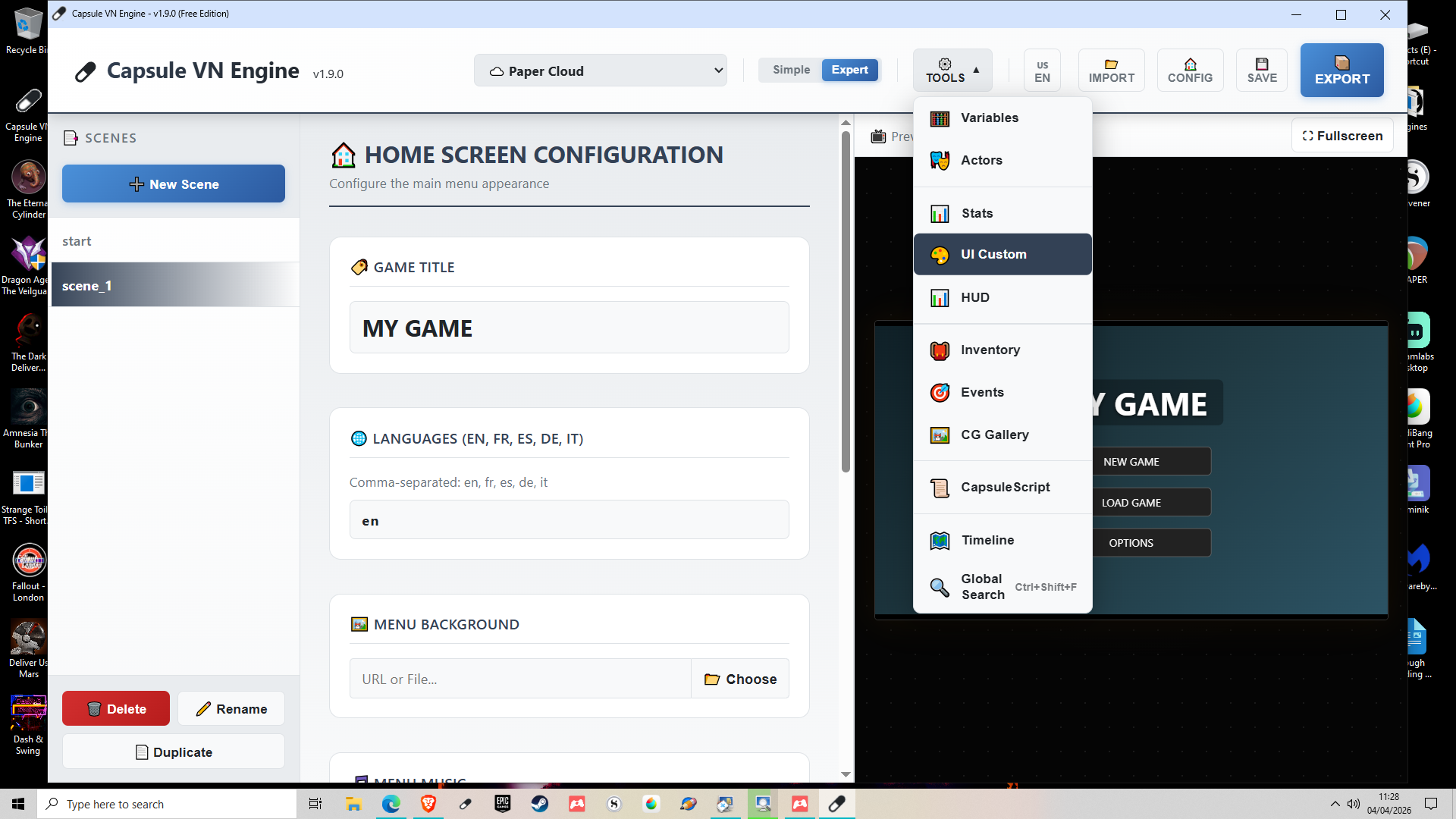
Secondly, buttons. You can absolutely change these. In the same drop-down menu just select UI Customisation. This lets you change out buttons, dialogue box backgrounds, and menu images.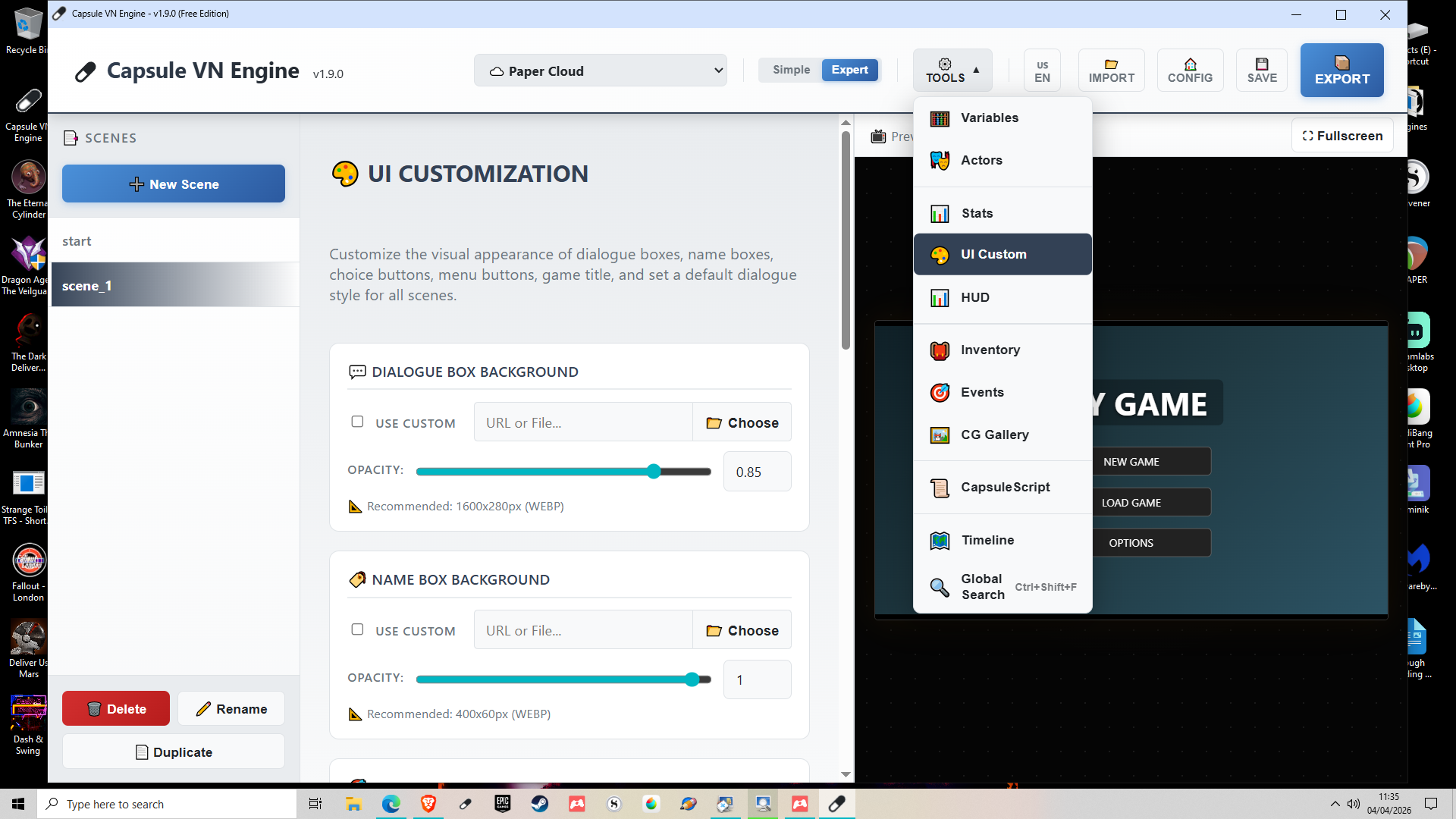
If you need an interactive button that needs to act as an invisible area (like a touch map, for example) just put in a standard map image then add buttons targeting what you need, or use Point-and-Click Hot Zones in the scene options itself.
Hope that helps!
Hay! Thanks a lot for the guidance! Shore gonna try it as it is more simpler then Ren Py, and by side I love little creators work put in this stuff!
Thank you so much! It really warms my heart to see this kind of support for indie creators.
Making a tool that is much easier to use than Ren'Py is my absolute goal, so I really hope you enjoy the experience!
Have fun experimenting with Capsule, and welcome aboard! ✨
Double-checked the license, and yes! You can make and sell your games on CapsuleVN, so long as you do not sell the engine.
The detail is here: https://capsulevn.com/license.html
What’s the ETA for version 2.0? I’d rather wait on that to start seriously using the system, if it’s not too far away.
I'd like to know that too! Also, is there any chance of native Linux support in version 2.0?
Great question! Yes, native Linux support is absolutely planned for version 2.0! > Since the engine is built on modern web technologies, packaging it for Linux is completely doable. Even though I mainly develop on Windows, I am setting up the build pipelines so that version 2.0 will launch with native executables for both Windows and Linux users right out of the box.
Thank you both for the hype and support, it really motivates me to push these cross-platform features forward!
Version 2.0 is a massive milestone that completely revolutionizes the engine under the hood. Because it's such a huge overhaul, it’s taking a bit of time to polish perfectly, but the good news is that the vast majority of the work is already done!
I don't have a strict ETA just yet as I want to ensure absolute stability for this big leap, but we are getting closer every day.
That being said, don't hesitate to jump into version 1.9 right now! It is already rock-solid for creating and exporting your visual novels, and learning the basics today will make your transition to the power of 2.0 even smoother. Stay tuned!
I'm planning a VN that has animated scenes. Will there ever be version with like a video player? Or like let me upload a gif for an animated menu? I can do these things in Renpy, but an engine that doesn't need me to code has me chomping at the bit haha
Hi there! Thanks for the feedback and your interest in the engine!
You will be happy to hear that the engine actually supports both of these features natively, with absolutely zero coding required.
For your animated menus, the engine accepts standard image formats, including animated GIFs. You can simply upload a GIF as your main menu background to give your game that dynamic, classic Japanese visual novel feel right from the title screen.
For animated scenes, the engine natively reads video files (like .mp4 or .webm). You can seamlessly use them as scene backgrounds to play your anime-style cutscenes, and they are also fully supported in the unlockable CG Gallery.
Let me know if you have any other questions, and have fun creating your VN!
been keeping my eye on this for a while and i will say im impressed with what it is so far.
now i do have a question that might be dumb, but i haven't figure it out yet: how do you make character switch sprites between dialogs in an Scene? or make then appear and disappear in that same scene?
Hello izrax, thanks a lot, im glad you like Capsule !!
Actually the expression/sprite stays the same throughout the scene. To switch sprites between dialogues, you currently need to split into multiple scenes that chain together with "Auto Next Scene". Each scene can have a different
charactersconfiguration (different expression, position, or even remove a character entirely). Since transitions can be set tonone, this feels seamless to the player.However, that's a relevant idea, so I think I'll add the option to include a BBCode [expr:actorId:expression] in the dialogue to allow changing the expression within the same scene. This would help reduce the number of scenes. Excellent idea!
So in 2.0, in the same scene you will be able to make something like :
[expr:alice:happy]I found the key !
[expr:alice:sad]But at what price...
[expr:alice:angry]I will never forgive !
ooh i see. yeah this seemed counter intuitive cause a scene most time should hold all the actions . plus that would make the visual timeline less cluttered and efficient .
may i suggest you also add the ability to change characters, music/sfx , and background too.
I totally agree and you will be able to do it in v2 :)
I’m getting very concerned that you’ve gone completely silent for weeks now. What’s happening with this project?
Don't worry, news are coming soon !
I just made a significant monetary donation to this, even though I haven't even downloaded the tool yet, on principle alone. This is an extremely exciting and promising project for non-programmer VN design and development. In fact, based on its current trajectory, I could seriously envision this being a major disruptor in the whole VN dev landscape ... possibly even displacing Ren'Py as the new "point of entry" for beginning VN devs.
For context, I'm currently developing my first game ... an adult RPG / eroge VN / fantasy dating sim / magic card battle hybrid ... in Unity with Naninovel. While I wouldn't expect Capsule to be able to handle Unity-like things such as particle systems or post-processing effects (at least not in the near future), I can already imagine recreating my entire project in this engine.
Again, totally sight unseen at this point (so maybe this will be apparent once I start playing in it), but some key features that I would need to fully embrace Capsule include:
These are just my initial thoughts. I'd be glad to help beta-test new updates to the engine, as I'm very much in the not-traditional-VN game development camp. Keep up the amazing work!
Thank you so much for the incredible support and the generous donation! Reading your enthusiasm completely made my day. Your adult RPG / dating sim / card battle hybrid sounds like an epic adventure, and it’s exactly the kind of ambitious project I’d love to see brought to life in Capsule! I must admit I've played a considerable number of hybrid visual novels for adults. The card game style (for battles, for example, or for creating conditioning builds) is a fairly niche type of game, and it's not the easiest to make. I wish you the best in your game creation!
Naninovel is an excellent choice for those who are proficient in Unity. Capsule doesn't have Unity's technical power and never will, remaining a monolithic engine. And besides, I'm not trying to compete with engines like Naninovel, which is based on Unity, or DiaLogic, which is based on Godot; they're not targeting the same audience at all. Capsule isn't limited to games; it can be used for interactive lessons, presentations, and more.
As a narrative/RPG engine, Capsule already surpasses well-established engines like TyranoBuilder, Visual Novel Maker, Twine, Narrat, and others. Ren'py remains technically more powerful with its Python code, which unlocks almost unlimited capabilities, but it doesn't measure up in terms of portability, ease of use, security, project management, native features, and even longevity (since an HTML game created with Capsule will still work in 2050). Not to mention that the CapsuleScript DSL is currently the only one that allows for the automated creation of game architectures via simple LLMs.
And this is just version 1.9.0; version 2.0 will add an incredible array of features while increasing stability and power, always keeping in mind the need to make game creation accessible to both beginners and professionals.
You'll be happy to know that several of the features you listed are already in your inventory:
Regarding your audio requests: currently, the engine operates on two primary audio tracks (Music and SFX) with their own volume sliders in the options, alongside the TTS features (in V2, not released yet). Expanding this into a dedicated 4-channel mixer (BGM, Looping Ambient, Voice, and One-off SFX) with independent on-the-fly volume sliders is a fantastic idea. I am definitely adding this to the roadmap to fully support proper voice-acted VNs!
I would absolutely love to have you onboard as a beta-tester! Feedback from developers pushing the boundaries of traditional visual novels is exactly what I need to make Capsule a true game-changer. Let's keep in touch!
Hello again! Can't import a previously exported project, even a default one. Can you fix this and add a logging system for debug purposes?
I can save project and then import. But in default save file i cant find a way to set up resoluton to 1080x2400
Hi Corvi, thanks for your feedback, i hope you have fun with the engine !
The exported projects all have an obfuscated section, a built-in anti-cheat system.
This makes the file incompatible with any attempt at a complete translation and therefore with importing it into the engine. I wouldn't be able to translate one of these files myself. That's why you absolutely must use the save function. Exporting is only for publishing the game.
For debugging, you already have logic preview, project health, and development mode. No other engine offers this natively.
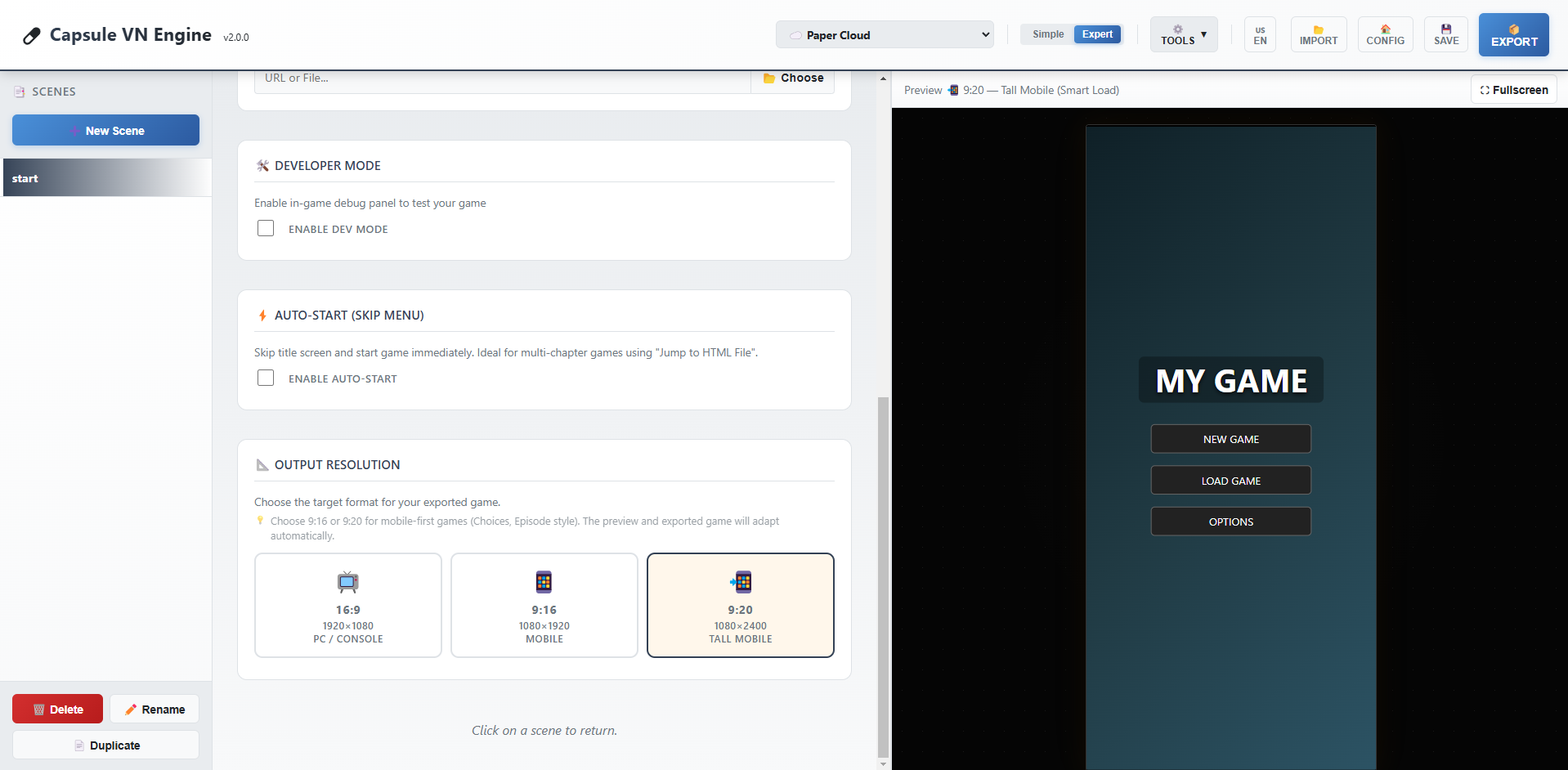
V2 with include a resolution function to go from 16:9 to 9:16 and even 9:20.
Until then you have to find this in the exported game :
#game-viewport { position: absolute; width: 1920px; height: 1080px;
And replace it by :
#game-viewport { position: absolute; width: 1080px; height: 2400px;
Yes, unfortunately Capsule 1.9.0 is not yet optimized for this type of format, so it won't necessarily be very intuitive.
Hello from Ukraine! How can I use this engine to create a vertical NVL novel in 9:20 format? Like this: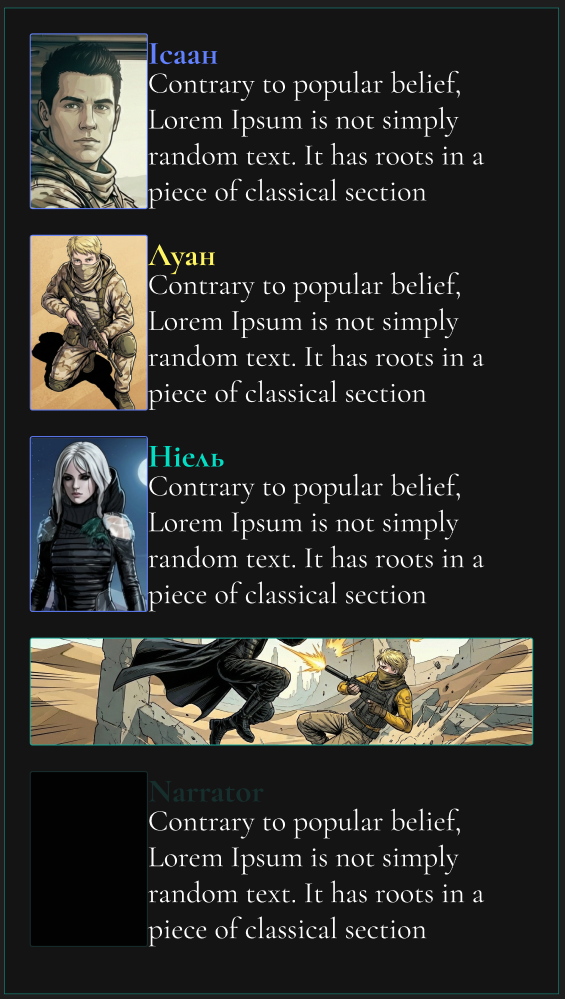
Hello from France! 🌸 Thank you so much for trying out Capsule VN Engine, it's awesome to see it reach creators in Ukraine!
Currently, the engine defaults to the classic visual novel landscape format (16:9, 1920x1080). However, since Capsule exports everything into a single, clean HTML file, you can easily "hack" it to fit a 9:20 vertical smartphone format!
Here is the quick ninja way to do it:
1. Tweak the Engine's CSS Once you export your game, open the
.htmlfile with any text editor (like Notepad or VS Code). Look near the top for the<style>tags. Find the#game-viewportrule and change the resolution:width:1920px; height:1080px;width:1080px; height:2400px;(This gives you a perfect 9:20 ratio!)2. Adjust the UI Because the screen is now narrower, you might want to find the
#dialog-boxin the CSS and adjust itswidthandbottommargins so the text box fits perfectly on a vertical screen like a modern Otome game. 📱3. Use Portrait Backgrounds Simply upload vertical backgrounds (1080x2400) directly into the engine while building your story. They will look stretched in the editor, but will display perfectly in your final modified HTML file!
I am definitely taking notes and planning to add a native "Vertical Mode" switch inside the editor for a future update. I would love to see the vertical novel you create with it! ✨
Hello CapsuleTeam,
I see there are a lots of new features in 1.8.32, can we expect a faq or manual, it would really help.
Thanks.
Hello!
Thank you so much for your interest and for reaching out. You are absolutely right—version 1.8.32 introduced a lot of powerful mechanics (like the inventory, QTEs, and advanced logic) to help creators build rich, anime-style visual novels, and proper documentation is the next logical step!
Right now, I am looking into the best way to provide this. I am planning to create a comprehensive guide to cover all the features.
In the meantime, don't hesitate to rely on the tooltips available inside the editor (especially in Expert Mode), and feel free to ask any specific questions you might have right here in the comments. I'd be more than happy to help you figure out a specific feature!
Happy creating! 🚀
Gave this a download on the off-chance it would work for my horror puzzle vn, and I'm really impressed so far! There's stuff it obviously needs, I couldn't find interactive areas for example (that could just be me though), but I'm surprised at how much is already here. I like the options for character movement - I'm thinking I'll make the front menu as a scene and that will let me animate the salt ring if I set it as a character.
Honestly, this was a really pleasant surprise!
Would like to be able to remove the main menu and use a scene for it instead, and be able to shut off the dialogue box per scene, as well as interactive areas, but honestly - for such a new engine it's super promising.
Wow, thank you so much for your feedback! 🌟 It's great to see that you're planning to create a horror and puzzle game with Capsule.
You're currently using version 1.6.2, but I have some excellent news: almost everything you mentioned is already implemented in the upcoming v1.8.0 update (and that's just a small part of all the new features coming in version 1.8.0)!
Interactive Zones: The new version introduces a complete point-and-click system (interactive zones) with customizable cursors (magnifying glass, hand, etc.). You'll be able to create real puzzle scenes.
Customizable Main Menu: It's already possible to bypass the main menu in version 1.6.2; just go to GUI and check the Enable Auto-Start box.
Hiding dialogues: This is already possible. When editing a scene, simply leave the name and dialogue fields empty to make the dialogue window disappear.
Animated salt ring: This won't be available in version 1.8.0 (although effects can already be applied to character appearances), but it's already functional in version 1.9.0, which I'm currently working on. This upcoming update will support sprite sheets, allowing you to easily create looping animations for any character (or object).
I'm working hard to refine Capsule VN Engine. Stay tuned, version 1.8.0 should revolutionize your project! 🚀
That's fantastic! You work really fast :D
I try... I try ;)
Hi CapsuleTeam, thanks for your app, it's easy to use. I plan to use it for a school project, is it possible to have some effects like rain or snow?
Hello TheDivide,
Thanks for your feedback, i wish you the best with your project.
Concerning the effects, I'm working hard on it, you've given me a real challenge! But i think it should be done in the next version.
Nice, im waiting for this 😊
Another short test
https://goliard.itch.io/another-capsule-vn-test
...and some observations:
But yeah, it's simple and straight forward, so kudos so far!
goliard
Hello goliard,
I'm glad you manage to use it well. You should take a look to the last update, it will make your experience better. About your observations :
- You can delete a scene, just select a scene and click on the red button called "delete", next to "duplicate" and "rename".
- It's a good point, i will think about it.
- You can have many character appearance in the last update:
- It's fixed in the last version, i managed to make a test with more than 50 scenes without any bug.
Thanks again for your feedback, it helps a lot !
Hi
How come I didn't notice that DELETE button? Weird.
Great to see things are moving fast! I'll play with it again in a little while
g
I'm glad to tell you that next version will include a "splash screen" function. Coming soon :)
Brilliant! Keep it coming!!
Hello, dear developer.!When I first met, I expressed my expectation for this software.✧*。٩(ˊᗜˋ*)و✧*。I hope this editor can support it in the future.The language of Chinese.(I, a China player, expressed my expectation.)course, I am also looking forward to one-stop export to apk.Thank you for your continuous development and update!
(ps:Is the character in the editor icon the official oc?The painting style of the character looks cute and kind.(This is just a little abrupt problem, so don't worry about it.))
Hello my friend,
Thanks for your feedback. Sure, i will add chinese and japanese in the future.
Yes, this character will probably be our muse for the rest of Capsule's life :)
Hello CapsuleTeam!(✧∇✧)!
Thank you so much for your warm and prompt reply! It's great to hear that Chinese language support is on the roadmap - I'm really looking forward to it!
I've tried the engine and I'm impressed by its potential! The support for variables and branching is a solid foundation for storytelling.
To help me plan my project better, I have a couple of questions about the future direction:
Are there any plans to make the exported HTML project more optimized for packaging into standalone applications (like APKs for mobile)?
Could you tell me a bit more about the two characters (the green-haired one and the red-haired girl who loves painting)? They both have such unique and charming designs! Are they the official OCs of the team? They really spark imagination!One day, after I practice my painting skills, I want to draw free illustrations for them.
Wishing you the best with the development! I'll be cheering for you from the sidelines.
Best regards!♥(。→v←。)♥
Hello! (✧ω✧)
Thank you so much for your energy and kind words! It really motivates me. I am indeed working hard to make Chinese support a reality soon.
Regarding your questions:
1. Mobile Packaging (APK): Actually, Capsule VN Engine is inherently optimized for this! Because it exports a Single HTML File with zero external dependencies (no folders, no loose assets), it is incredibly easy to wrap into an APK. You can use tools like Capacitor, Cordova, or even simple "Website to APK" converters. You just feed them your game's HTML file, and since all data is embedded inside, it works offline on mobile immediately without any path/loading issues. We plan to write a tutorial on this in the future!
2. The Characters: I am so happy you like them! Yes, they are the official mascots of the engine.
I would be absolutely honored to see your illustrations of them! Please do share them if you draw them one day!
Thank you again ♥
Feature Suggestion: Enhancing Input Box for Richer Branching Narratives
Hi!CapsuleTeam!ദ്ദിᵔ.˛.ᵔ₎✧
Thank you so much for your detailed and encouraging reply! It means a lot to me as someone who is passionate about creating interactive stories and truly believes in the potential of CapsuleVN Engine.
I'm particularly excited about the official mascots, Aiko and Laetitia. They perfectly represent the two sides of creation - logic and art. I'm currently learning drawing skills, and it's my goal to create illustrations for them once I feel confident in my abilities. I would be honored to contribute as an early supporter!
♡(*´∀`*)人(*´∀`*)♡
Based on my experience with other visual novel engines, I have a feature idea that I believe could greatly empower creators to build more immersive and branching narratives.
Thank you for your detailed and encouraging reply regarding the APK export and the official characters! I'm very excited about the future of the Capsule engine.
I'm an indie creator passionate about narrative-driven games. While exploring tools, I often imagine scenarios where players advance the plot by typing specific words or phrases rather than just selecting from multiple choices. For example:
In a puzzle segment, entering a secret code (like "moonlight" or "raven") to unlock a door.
The story branches based on a key response the player types.
I understand that complex Natural Language Processing might be challenging to implement. Therefore, I'd like to suggest a potentially more feasible feature: a customizable "Keyword Input & Judgment" component.
The ideal functionality might include:
Preset Keywords: Creators can pre-set several keywords or phrases they expect players to input (e.g., setting keyword "trust" to trigger branch A, and "silence" for branch B).
Fuzzy Matching: The system could recognize if the player's input contains these keywords, without requiring exact match, improving user experience and error tolerance.
Conditional Jump: Upon a successful match, the game could jump to a designated storyline or scene, similar to handling conditional branches.
This functionality would unlock new possibilities for genres like mystery, puzzle, and high-freedom RPGs, moving interactions beyond multiple-choice questions towards "open dialogue" or "password-based" immersion.
I've previously used an engine called Kocho (which has a blue butterfly as its icon) for simple prototypes. Its interface was quite intuitive for basic input handling. Perhaps some interaction logic from it could offer a reference point for usability design, even though Kocho is no longer updated.
Implementing such a feature would be a groundbreaking "killer feature" for creators focusing on deeply interactive stories. Thank you again for creating such a promising tool and listening to community feedback! I look forward to witnessing the growth of the Capsule engine.
Best regards!つ♡⊂
——❤️🌹CH白棣
Hello again CH白棣! (つ✧ω✧)つ
Thank you so much for this incredibly detailed feedback! I really appreciate you taking the time to explain the logic and even citing Kocho as a reference (I remember this engine, it had some great ideas!).
I have great news for you: You are perfectly in sync with my roadmap.
i was just analyzing the roadmap for the next major updates, and a "Text Input / Keyword System" is actually in our priorities! Your suggestion confirms that this is exactly what creators need right now to unlock the Mystery/Puzzle genre.
I will definitely implement the logic you described:
player_answer).Consider it done! This feature will be integrated into the upcoming v1.8 update (because the 1.7 is already done but not released yet).
Thank you for helping us shape the future of Capsule. Your feedback is invaluable! ❤️
Best regards, Capsule Team
Seems fine, mechanics look good, but can't change the language to English...
Hi,
Thanks for your feedback. If you're referring to the application itself, it's normally set to English by default. Otherwise, you need to click the button to change the language in the menu at the top right.
If you're referring to the visual novel preview on the right, it's possible that the preview was displayed in French.
In that case, click on "Config." This will display the visual novel's start screen. There, click on "Options" in the preview screen and select English. This should fix the problem and save your preference locally in your browser. So, every time you log back in, it will be in English.
Let me know if this resolved the issue.
Thanks!
I tried all that. It didn't work.
Hi Goliard,
Can you add a screenshot please? I just tried with Edge, Opera and Chrome and it's working.
EDIT: I've been working on a new multilingual model; now the application appears in English by default, both the application itself and the preview. This should have resolved your issue.
To add other languages, you need to click the "CONFIG" button. If you change the interface language and have added the language via "CONFIG", the preview will change dynamically.
Now it works fine! I really like the UX -- very friendly and intuitive. Hope to use it for a project soon.
Thanks for your feedback, I'm glad you like the app. The next step is to allow users to edit scene names and also move them around, in case they accidentally switch scenes.
I think the update will be live soon (probably today).
I'll be launching a Jam soon to invite developers to test the app, and I hope you'll be among the participants :)